
The word “usability” has many different connotations. However, the definition is simple and can be applied to almost anything.
If something is “usable,” according to Steve Krug, author of “Don’t Make Me Think,” it means:
“A person of average (or even below average) ability and experience can figure out how to use the thing to accomplish something without it being more trouble than it’s worth.”
When it comes to website usability, it can make the difference between making or breaking a sale or gaining new potential business. In other words, it’s extremely important and cannot be overlooked. Does your website provide a user-friendly experience?
Let’s take a look…
Eliminate Mental Chatter
Does your website create questions in the user’s head? As Steve Krug explains, when you’re creating a site, your job is to get rid of the question marks. For example:
- Don’t make the page so busy the user doesn’t know where to start
- Don’t make it difficult to figure out what’s the most important on the page
- Don’t make people think “Is this clickable?”
The goal is to eliminate as much “mental chatter” as possible. It will add up and hinder the user’s experience. Of course, everything can’t be self-evident, but try to make it as self-explanatory as possible. Everything should be figured out at a glance.
Make Content Scannable
Does your website have a ton of bulky text? If so, you’re breaking another usability law. Think about it- when was the last time you read an entire article or website? Don’t lie- I know you scan headlines and throw in the towel if an article is too long : P
Let’s take a look at typical behavior. When people land on a website they:
- Glance at each page
- Scan some of the text/headlines
- Click on the first link that catches their interest or vaguely resembles the thing they are looking for
- If we don’t find what we are looking for, we click the back button
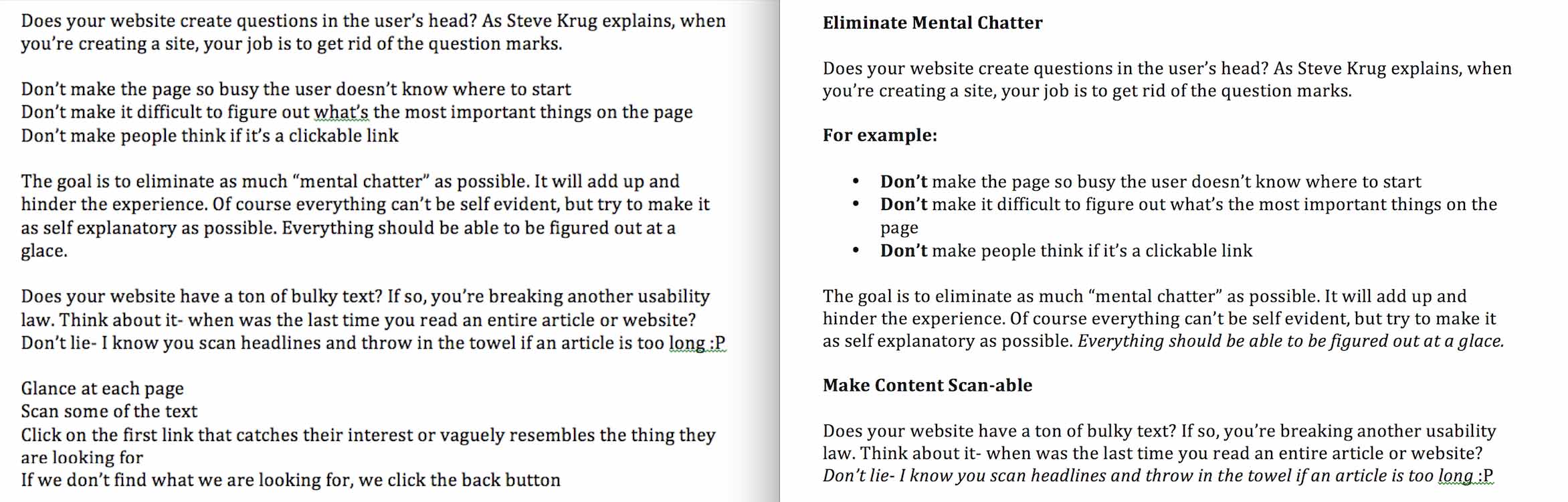 Although this seems extremely simplistic, it’s shown to be true. Take a look at the picture above. Which one is easier to read?
The one on the right, hands down.
Make your content easy to read and follow. By doing so, you will be providing a better user experience.
Make Every Click Count
Most marketers aim to have as few clicks as possible to get to a final destination. This is best practice, as you want to provide the best user experience possible. But sometimes that’s not an option. The goal is to make every click count. Every click must have a thought behind it and bring you to the next appropriate step.
For example: When presenting a difficult choice to the user, divide it into simple clicks. As Steve Krug explains, in the rare instance where the choice can’t be elegantly broken down, provide accompanying guidance. Which is:
- Brief
- Visually noticeable
- Available precisely when needed
Don’t take users down a path of never-ending clicks. They’ll become frustrated and give up.
Omit Pointless Unneeded Words
A page containing a ton of text is intimidating. Get your message across with as few words as possible. Like a machine, there is no point in having extra parts. It needs to be as efficient as possible. Steve Krug suggests to get rid of half the words on each page, and then get rid of half of what’s left.
For example:
- Happy talk: text containing boring clichés suggesting how great a business is. It’s a whole lot of “blah blah blah.”
- Instructions: users read these only if they’ve failed several times. Your goal is to make a process as self-explanatory as possible. Minimum instructions are needed.
It Needs to Be Mobile Friendly
With desktop search surpassing desktop search, a mobile-friendly website is a must. We’ve all landed on a website where you have to squint like crazy to read what they are saying. I experienced this the other day when I was looking for a delicious recipe. It was a pain to read, so I decided to move on and find something that wouldn’t annoy the heck out of me when I’m trying to cook.
Your website is not mobile friendly if:
- Text is too small to read
- Content is wider than screen
- Links are too close together and hard to click
- Phone number is not clickable
- Map is not clickable- meaning there is no way to click for directions
You can check if your website is mobile friendly here. We’ve also written a more in-depth article to help you out!
There’s a lot that goes into building a website. It’s not for the faint heart. If you’re looking to revamp your website to make it as user-friendly as possible, click the button below!